

Product Overview
Crucial 2.5-Inch SSD to 3.5-Inch Drive Bay Bracket, Unused Stock With Screws
Condition
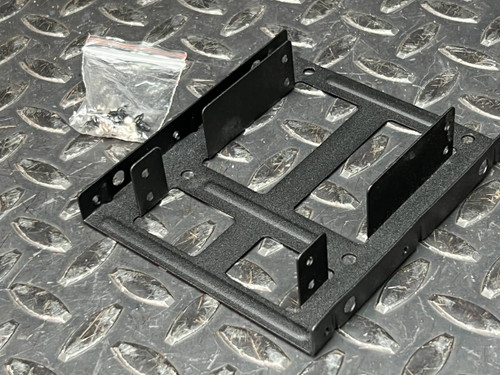
Unused, New Old Stock. The photos show a clean black plate with no scratches, scuffs, or installation marks around the mounting points, and the mounting hardware sits loose on the face in clear zip-lock bags with a light-colored pad. Four black grommeted mounting points sit on the top face, and both side rails are drilled and dimpled for bay screws. Against the PartsMine ruler the plate measures approximately 10 cm across, consistent with a 3.5-inch bay footprint.
Same or next business day shipping from our Idaho warehouse. Honest pricing, no nonsense.
Online since 1999. We are here for our customers, with a no-hassle satisfaction guarantee.
Product Overview
The Crucial CTSSDBRKT35.002 is the adapter bracket Micron shipped so a 2.5-inch solid state drive could bolt into a standard 3.5-inch desktop drive bay. It is a single stamped aluminum body, light enough to hold in one hand and rigid enough to keep the drive square with the SATA connectors once the cage screws are in. The face carries four grommeted mounting points and the folded side rails are drilled on the standard bay pattern, so the drive sits at the correct height instead of hanging off two screws. Mounting screws come in clear zip-lock bags that rest loose on the plate rather than attached to it, with both coarse and fine thread pitches visible through the plastic. Metal rather than plastic means the bracket also conducts a little heat away from the drive body.
Key Features
- Function: adapts a 2.5-inch SSD or hard drive to a 3.5-inch drive bay
- Construction: single stamped aluminum body, black finish
- Mounting: four grommeted points on the face, drilled and dimpled side rails
- Hardware: two clear zip-lock bags of screws plus a light-colored pad, coarse and fine threads visible
- Size: approximately 10 cm across against the ruler in the photos
- Compatibility: standard 2.5-inch SATA SSDs and hard drives
- Thermal: metal body conducts heat away from the drive better than a plastic tray
- Origin: genuine Crucial product by Micron Technologies
Applications
- IT tech retiring a failing platter drive and dropping an SSD into a desktop whose cage is all 3.5-inch
- Builder finishing a tower where the case predates 2.5-inch mounting points entirely
- Bench tech setting up a cloning or imaging station that has to hold drives securely all day
- Small shop refreshing office machines one at a time and needing the drive to sit square in the cage
Frequently Asked Questions
Does the bracket come with mounting screws?
Yes. Bright zinc screws come in clear zip-lock bags resting loose on the plate, and one bag is pictured close up showing both coarse and fine thread pitches. We have not opened the bags to count them, so treat the photos as the spec and plan on your own hardware if you need a specific screw.
Will it fit any 2.5-inch SSD?
It is built around the standard 2.5-inch SATA drive pattern, so most SSDs and 2.5-inch hard drives that follow standard mounting dimensions will line up. Unusually thick drives are not confirmed here - measure your drive against the photos before ordering.
What condition is this bracket actually in?
It is listed as unused New Old Stock, and the photos show no tool marks and no thread wear at the mounting points. We have not test-fitted a drive in it. The five photos are of a representative piece from a small stock of identical brackets, so your bracket may not be the exact one photographed.
I only need a couple of these. Do I have to buy a ten-pack?
No. Buy the exact count your build needs, one for a single drive swap or three or four if you are converting a whole cage, instead of paying for a bulk lot and stashing the leftovers in a drawer. Shipping is $8 flat rate and goes free once your order passes $28, and orders leave our Idaho warehouse the same or next business day.
Cases kept their 3.5-inch bays long after drives stopped needing that much room, and this little stamped plate is the quiet fix for the gap. Bolt the SSD down, put the side panel back on, and let an older machine keep earning its spot under the desk.